MP560
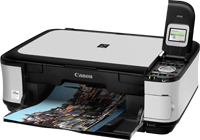
Compatible Canon PGI-520 & CLI-521
|
Canon PGI-520/CLI-521 (Top View)
|
Canon PGI-520/CLI-521 (Bottom View)
|
|
|
|
|
Canon PGI-520/CLI-521 (Side View with Clip on)
|
Compatible Canon PGI-520 & CLI-521 (Side View with Clip off)
|
|
|
|
Use the video below to see what the cartridges look like and how to install them. Please note, the video shows the Canon 570/571 range; the steps are the same for the cartridges for your printer. The appearance of compatible cartridges may vary.
Cartridge missing or damaged
- Remove the faulty cartridge from the printer.
- Make sure all the packaging clips and blue tape covering the copper part of the cartridge has been removed from the cartridge.
- Clean the contacts with a dry cloth or tissue.
- Pull the power cable out the back of the printer and leave the printer off for 15 minutes.
Ink in the cartridge, but not printing
- The cartridge may show as empty or produce faded print despite ink remaining.
- Printing stops once the cartridge reaches around 30% remaining ink, which is kept as a reserve.
- This reserve cannot be accessed and is used to keep the internal sponge moist and protect the printhead.
- This is normal behaviour and not a fault.
- The cartridge will need to be replaced.
Printing blank pages / fading on print
- If the print quality is poor or no ink is appearing on the paper, try performing 2–3 head cleans/nozzle cleans.
- Leave 20 minutes between each cleaning cycle.
- If the issue persists, switch off the printer and unplug it for 10 minutes.
- Re-install the cartridge and try printing again.
Printing blank pages
- The tape covering the breathing hole may not have been removed.
- Ensure the breathing hole on the cartridge is open by removing the small rip strip.
- This allows air to flow properly and enables the cartridge to print.
Printers that use Canon PGI-520 & CLI-521 cartridges
| Pixma iP3600 | Pixma iP4600 | Pixma iP4700 |
| Pixma MP540 | Pixma MP550 | Pixma MP560 |
| Pixma MP620 | Pixma MP630 | Pixma MP640 |
| Pixma MP980 | Pixma MP990 | Pixma MX860 |
| Pixma MX870 |
Printer Consumables (Canon PGI-520 & CLI-521)
| 2932B001AA | 2932B001AA-CPT | 2932B009AA | 2933B001AA |
| 2933B001AA-CPT | 2933B010 | 2934B001AA | 2934B001AA-CPT |
| 2934B007AA | 2934B007AA-CPX | 2935B001AA | 2935B001AA-CPT |
| 2936B001AA | 2936B001AA-CPT | CLI521-PACK | CLI521-PACK-OLD-CPX |
| PGI520-CLI521-PACK | PGI520-CLI521-PACK-CPT | QY6-0073-000 | CLI521-PACK-CPX |
| 2932B009AA-OLD2 |
Brand names and trademarks are the property of their respective holders and are used for description purposes only.
Brand names and trademarks are the property of their respective holders and are used for description purposes only.